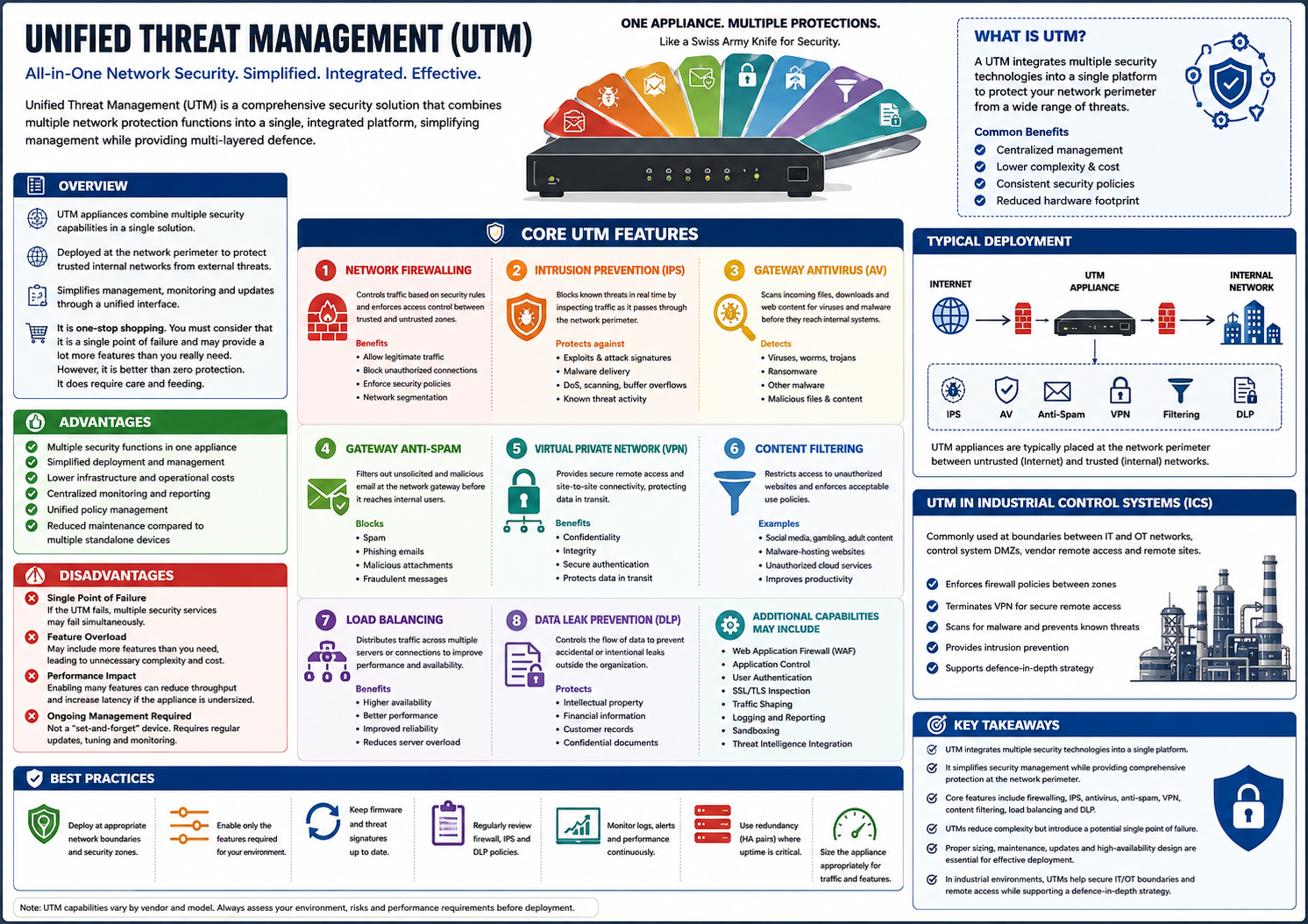
Unified Threat Management (UTM) is an all-in-one network security platform that combines multiple cybersecurity
functions into a single appliance or software solution.
Rather than deploying separate security devices, a UTM centralizes protection, making deployment, configuration,
monitoring, and maintenance simpler.
Think of a UTM as a Swiss Army knife for network security—many security tools integrated into one device.
Figure – Unified Threat Management integrates multiple network security functions into a single platform.
Purpose
A UTM provides:
Centralized network security
Simplified administration
Reduced hardware footprint
Lower management overhead
Consistent security policy enforcement
It is commonly deployed at the network perimeter, protecting communications between trusted internal networks and
untrusted external networks such as the Internet.
Typical UTM Features
A Unified Threat Management appliance may include:
Network Firewall
Intrusion Prevention System (IPS)
Gateway Antivirus
Gateway Anti-Spam
Virtual Private Network (VPN)
Content Filtering
Load Balancing
Data Leak Prevention (DLP)
Some enterprise UTMs also include:
Web Application Firewall (WAF)
Application Control
User Authentication
SSL/TLS Inspection
Traffic Shaping
Logging and Reporting
Sandboxing
Threat Intelligence Integration
Core Security Functions
Network Firewall
Controls network traffic using predefined security rules.
Purpose
Allow legitimate traffic
Block unauthorized connections
Enforce security policies
Separate trusted and untrusted networks
Benefits
First line of defence
Network segmentation
Access control
Intrusion Prevention System (IPS)
Monitors and inspects network traffic in real time to detect and block known attacks before they reach internal
systems.
Protects against:
Exploits
Malware delivery
Buffer overflow attacks
Network scanning
Denial-of-Service (DoS) attempts
Known attack signatures
Unlike intrusion detection alone, an IPS actively blocks malicious traffic.
Gateway Antivirus (AV)
Scans files, downloads, emails, and web traffic before they enter the internal network.
Detects:
Viruses
Worms
Trojans
Ransomware
Other malware
This prevents infected files from reaching endpoints.
Gateway Anti-Spam
Filters unwanted and malicious email before delivery.
Blocks:
Spam
Phishing emails
Malicious attachments
Fraudulent messages
Benefits include:
Reduced inbox clutter
Lower phishing risk
Improved email security
Virtual Private Network (VPN)
Provides encrypted communication across untrusted networks.
Common uses include:
Secure remote worker access
Site-to-site office connections
Secure industrial remote maintenance
Benefits:
Confidentiality
Integrity
Secure authentication
Protection of data in transit
Content Filtering
Restricts access to websites or online content based on organizational policy.
Examples:
Social media
Gambling
Adult content
Malware-hosting websites
Unauthorized cloud services
Benefits:
Reduces malware exposure
Supports acceptable use policies
Improves productivity
Load Balancing
Distributes traffic across multiple servers or internet connections.
Benefits include:
Higher availability
Better performance
Improved reliability
Reduced server overload
Although not a security feature itself, it is commonly included in many UTM appliances.
Data Leak Prevention (DLP)
Monitors and controls sensitive information leaving the organization.
Protects against accidental or intentional disclosure of:
Intellectual property
Financial information
Customer records
Confidential engineering documents
Benefits:
Prevents data loss
Supports regulatory compliance
Protects sensitive information
Advantages of UTM
Multiple security functions in one appliance
Simplified deployment
Easier management
Lower infrastructure costs
Centralized monitoring
Unified policy management
Reduced maintenance compared to multiple standalone devices
Ideal for:
Small businesses
Medium businesses
Remote offices
Industrial control systems requiring straightforward perimeter protection
Disadvantages
Single Point of Failure
If the UTM fails, multiple security services may fail simultaneously, potentially exposing the network unless
redundancy is implemented.
Feature Overload
Many UTMs include capabilities that may never be used, leading to:
Increased complexity
Higher licensing costs
Unnecessary resource consumption
Performance Impact
Enabling many security features simultaneously (IPS, antivirus scanning, SSL inspection, VPN, etc.) can reduce
throughput and increase latency if the appliance is undersized.
Ongoing Management Required
A UTM is not a "set-and-forget" device.
It requires ongoing maintenance, including:
Firmware updates
Security signature updates
Rule tuning
Log monitoring
Policy reviews
Performance monitoring
UTM in Industrial Control Systems (ICS)
Within industrial networks, a UTM is commonly positioned at the boundary between:
Corporate IT and OT networks
Control system DMZs
Remote access gateways
Vendor maintenance connections
Common roles include:
Firewall enforcement
VPN termination
Malware scanning
Intrusion prevention
Secure remote access
In high-availability or safety-critical environments, standalone or specialized industrial security appliances may be
preferred over an all-in-one UTM to avoid introducing a single point of failure.
Best Practices
Deploy at network boundaries and security zones.
Enable only the features required for your environment.
Keep firmware and threat signatures up to date.
Regularly review firewall and IPS policies.
Monitor logs and security alerts.
Use redundancy (high-availability pairs) where uptime is critical.
Size the appliance appropriately for expected traffic and enabled services.
Periodically review unused features and disable unnecessary services.
Key Takeaways
Unified Threat Management (UTM) integrates multiple security technologies into a single platform.
It simplifies security management while providing comprehensive perimeter protection.
Common features include firewalling, IPS, antivirus, anti-spam, VPN, content filtering, load balancing, and DLP.
UTMs reduce complexity but introduce a potential single point of failure.
Proper sizing, maintenance, updates, and high-availability design are essential for effective deployment.
In industrial environments, UTMs are commonly used to secure IT/OT boundaries and remote access while supporting a defence-in-depth strategy.