Packet Capture (PCAP) is the process of recording every packet transmitted across a computer
network. The resulting .pcap or .pcapng file contains a detailed record of
network communications and can be analysed after the event to investigate cybersecurity incidents, troubleshoot
communications, validate network configurations, or perform forensic investigations.
In Industrial Control Systems (ICS) and Operational Technology (OT), PCAP analysis provides one of the most
valuable sources of evidence because it records exactly what occurred on the network without modifying the
control system.
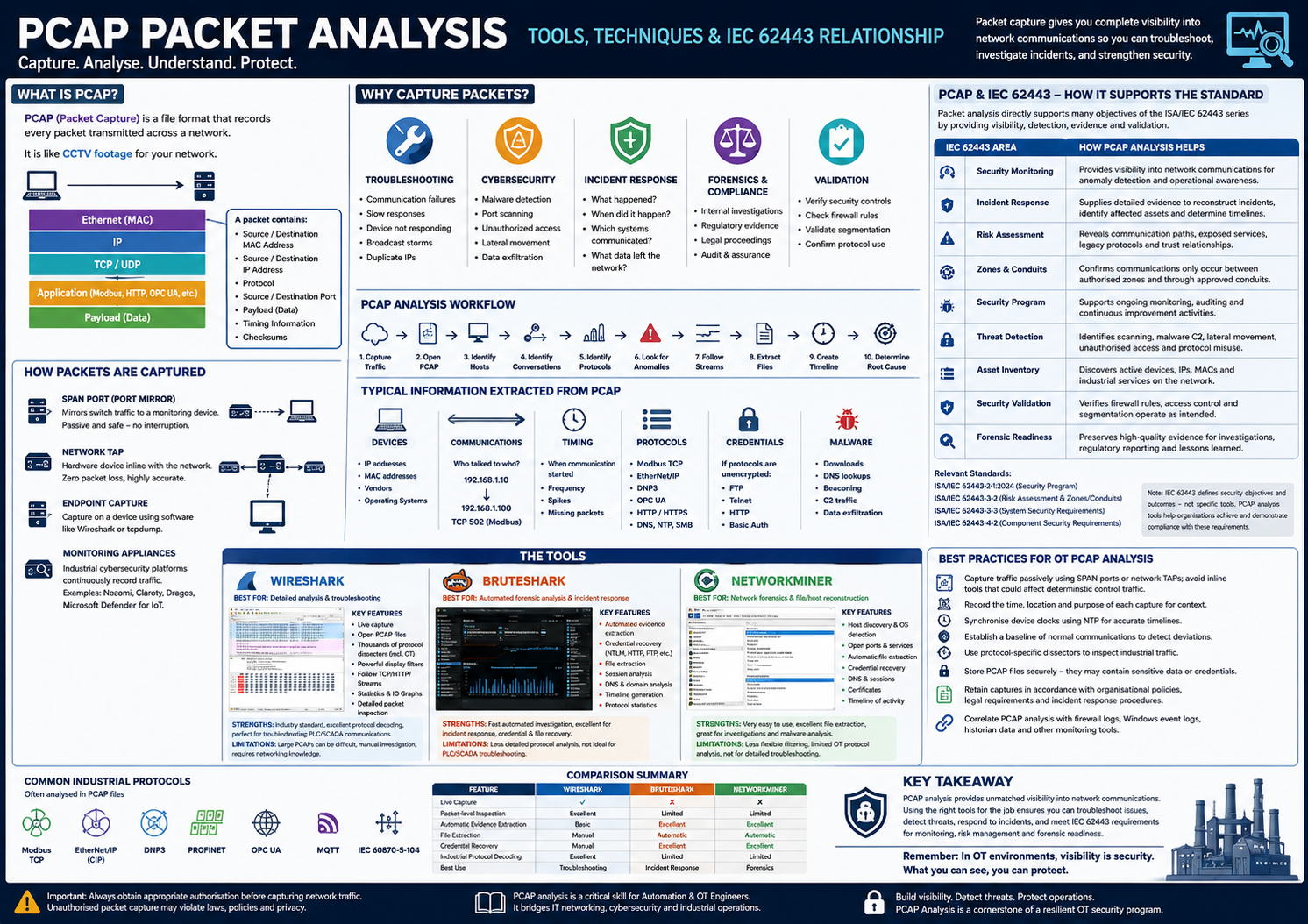
Figure – Packet capture records network traffic for troubleshooting, incident response, and forensic analysis.
What is a Packet?
Every communication on an Ethernet network is broken into small pieces called packets.
A packet contains:
Source MAC Address
Destination MAC Address
Source IP Address
Destination IP Address
Protocol
Source Port
Destination Port
Payload (actual data)
Checksums
Timing information
Example
PLC --------------------> SCADA

Ethernet
    IP
        TCP
            Modbus
                Read Register 40001
Each layer adds information to the packet.
What is a PCAP File?
A PCAP file is simply a recording of these packets.
Think of it as:
CCTV footage for a computer network.
Unlike log files, PCAP contains the actual network traffic.
A PCAP can show:
Every device communicating
Every protocol used
Every command sent
Timing between packets
Failed communications
Malware traffic
Unauthorized connections
Data exfiltration
Attack techniques
Why Capture Packets?
Packet captures are used for:
Troubleshooting
Finding why communications fail.
Examples:
PLC not responding
HMI disconnects
Slow communications
Broadcast storms
Duplicate IP addresses
Cybersecurity
Identify:
Malware
Command & Control traffic
Reconnaissance
Port scanning
Lateral movement
Unauthorized remote access
Incident Response
During an incident investigators need to know:
What happened?
When did it happen?
Which systems communicated?
Was malware downloaded?
What data left the network?
PCAP provides objective evidence.
Digital Forensics
Packet captures may be used in:
Internal investigations
Regulatory investigations
Legal proceedings
Packet Capture Methods
Packet captures can be collected using:
SPAN Port
Mirror switch traffic to a monitoring computer.
Preferred in industrial environments.
Advantages:
No interruption
Passive
Safe
Network TAP
Hardware device placed inline.
Advantages:
Zero packet loss
No configuration changes
Highly accurate
Often used for permanent monitoring.
Capture on Endpoint
Using software such as:
Wireshark
tcpdump
Useful for troubleshooting.
OT Monitoring Appliances
Industrial cybersecurity platforms continuously record traffic.
Wireshark is the world's most widely used packet analysis tool. It allows users to inspect every
packet individually.
Ideal for:
Network troubleshooting
Protocol analysis
Industrial communications
Education
Cybersecurity investigations
Main Features
Live Capture
Capture directly from:
Ethernet
Wireless
USB
Bluetooth
Open PCAP Files
Analyse previously captured traffic.
Protocol Decoding
Supports thousands of protocols including industrial protocols.
Examples:
Modbus
DNP3
EtherNet/IP
PROFINET
BACnet
CIP
OPC UA
Display Filters
Examples:
ip.addr == 192.168.1.20
tcp.port == 502
modbus
http
dns
icmp
arp
Follow Streams
Reconstruct:
HTTP
TCP
Telnet
FTP
Useful for reading conversations.
Statistics
Shows:
Endpoints
Conversations
Protocol hierarchy
IO Graphs
Flow Graphs
Packet Details
Displays:
Ethernet
IP
TCP
Application Layer
Every field can be expanded.
Wireshark Strengths
Excellent protocol decoder
Industry standard
Best troubleshooting tool
Supports industrial protocols
Detailed packet inspection
Wireshark Limitations
Large PCAPs become difficult
Requires networking knowledge
Manual investigation
No automated malware analysis
BruteShark
Overview
BruteShark is an open-source network forensic analysis platform designed to automate
investigation of PCAP files. Instead of viewing every packet, it extracts high-value forensic artefacts
automatically.
Main Capabilities
Automatically identifies:
Users
Credentials
Email addresses
Sessions
Files
Network shares
Domains
HTTP requests
SMB activity
Kerberos tickets
Credential Recovery
Can recover:
NTLM hashes
HTTP credentials
FTP logins
SMTP logins
When transmitted unencrypted.
Session Analysis
Shows:
Who communicated
When
How often
Which protocol
File Extraction
Extracts transferred:
Images
Documents
Archives
Executables
DNS Analysis
Builds domain relationships. Useful during malware investigations.
Not intended for troubleshooting PLC communications
Focused primarily on enterprise protocols
NetworkMiner
Overview
NetworkMiner is a Network Forensic Analysis Tool (NFAT). Unlike Wireshark, it reconstructs
activity from captured packets automatically. It is designed for forensic investigations.
Key Features
Host identification
Operating system detection
Open ports
Sessions
DNS
HTTP
Files
Images
Credentials
Certificates
File Extraction
Automatically extracts:
PDF
Word
Images
ZIP
Executables
Office files
Credential Recovery
Can identify:
FTP
HTTP
SMTP
POP3
IMAP
NTLM
Kerberos
Host Discovery
Automatically builds an inventory:
Host

↓

IP

↓

MAC

↓

Hostname

↓

Operating System

↓

Services
Capture traffic passively using SPAN ports or network TAPs; avoid inline tools that could affect deterministic control traffic.
Record the time, location, and purpose of each capture to preserve context for incident response and forensic investigations.
Synchronise device clocks using NTP to improve timeline accuracy across multiple systems.
Establish a baseline of normal industrial communications to help identify deviations such as new devices, unusual protocols, or abnormal command rates.
Use protocol-specific dissectors to inspect industrial traffic such as Modbus, EtherNet/IP, DNP3, and OPC UA.
Store PCAP files securely, as they may contain sensitive operational data or unencrypted credentials.
Retain packet captures in accordance with organisational policies, legal requirements, and incident response procedures.
Correlate PCAP analysis with firewall logs, Windows event logs, historian records, engineering workstation logs, and OT monitoring platforms for a complete investigation.
Relationship to IEC 62443
Packet capture and analysis directly support several objectives of the ISA/IEC 62443 series by enabling visibility
into industrial communications, validating security controls, detecting abnormal behaviour, and providing forensic
evidence following security incidents.
IEC 62443 Area
Relationship to PCAP Analysis
Security Monitoring
Provides visibility into network communications for anomaly detection and operational awareness.
Incident Response
Supplies detailed evidence to reconstruct cyber incidents, identify affected assets, and determine attack timelines.
Risk Assessment
Reveals communication paths, exposed services, legacy protocols, and trust relationships that influence risk evaluations.
Security Zones & Conduits
Confirms that communications occur only between authorised zones and through approved conduits, supporting network segmentation verification.
Security Program
Assists ongoing monitoring, auditing, verification of security controls, and continuous improvement activities.
Helps discover active devices, IP addresses, MAC addresses, and industrial services present on the network.
Security Validation
Verifies firewall rules, access control policies, protocol restrictions, and network segmentation operate as intended.
Forensic Readiness
Preserves high-quality evidence to support investigations, regulatory reporting, and lessons learned after cybersecurity events.
Key Takeaways
Packet capture (PCAP) records actual network traffic, providing objective evidence for troubleshooting, incident response, and forensic investigations.
Passive capture methods such as SPAN ports and network TAPs are preferred in OT environments to avoid disrupting control traffic.
Wireshark is the industry-standard tool for detailed protocol analysis and industrial communications troubleshooting.
BruteShark and NetworkMiner automate forensic evidence extraction, credential recovery, file extraction, and timeline generation from PCAP files.
PCAP analysis supports IEC 62443 objectives including security monitoring, incident response, threat detection, asset inventory, and forensic readiness.
Standards References
ISA/IEC 62443-2-1:2024 – Security Program requirements for monitoring, logging, incident response, risk management, and continual improvement.
ISA/IEC 62443-3-2 – Security risk assessment, security level target determination, and the design of zones and conduits, which can be validated through packet analysis.
ISA/IEC 62443-3-3 – System security requirements, particularly those related to network segmentation, communication integrity, monitoring, and restricted data flows.
ISA/IEC 62443-4-2 – Technical security requirements for IACS components, where packet captures can be used to verify that devices communicate only through expected protocols and services.
Note: The ISA/IEC 62443 standards describe security objectives and required outcomes rather than prescribing
specific tools. Wireshark, BruteShark, NetworkMiner, and similar PCAP analysis tools are practical implementations
that organisations commonly use to demonstrate compliance, validate security controls, support monitoring, and
investigate incidents within an IEC 62443 security program.