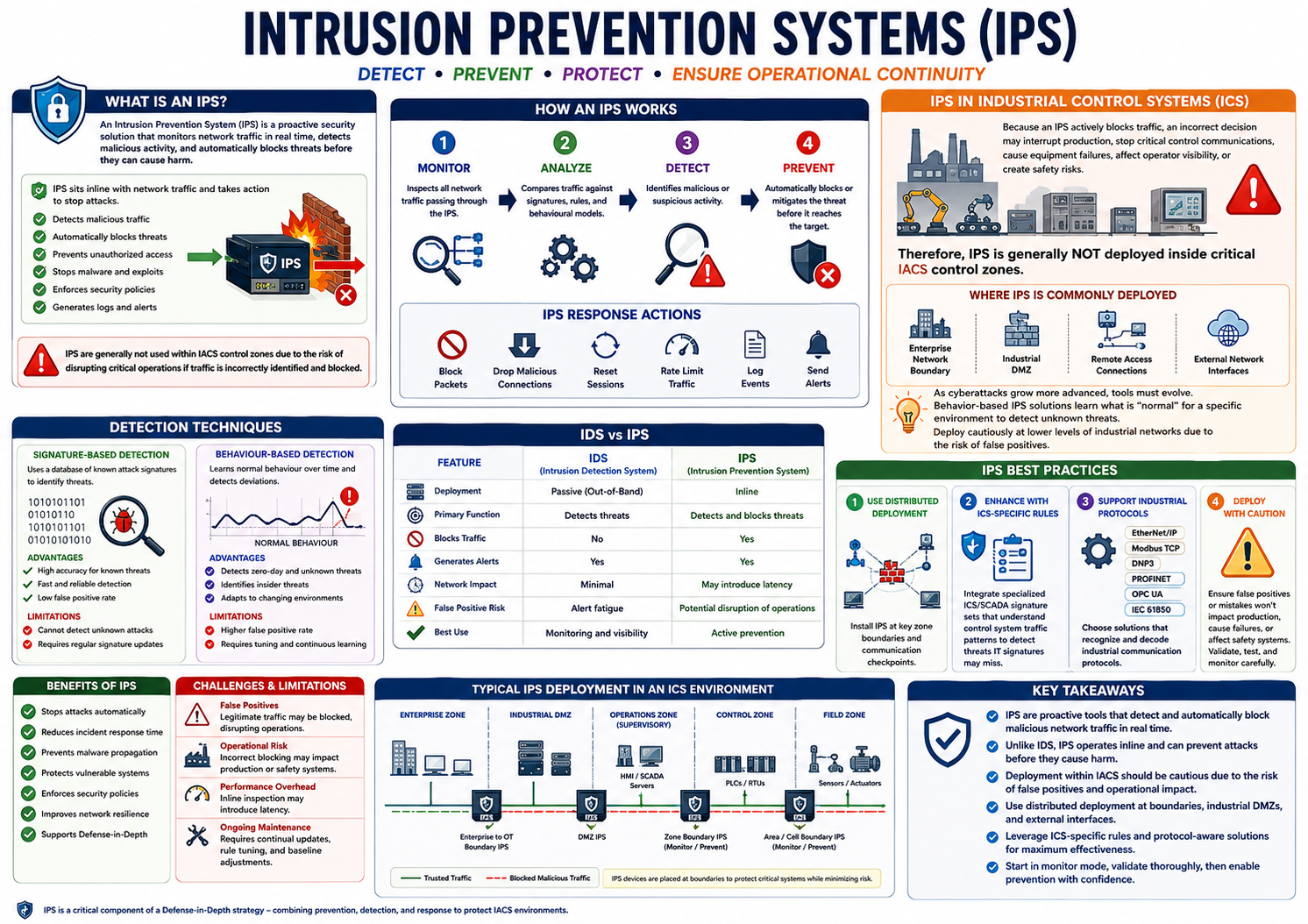
An Intrusion Prevention System (IPS) is a security device or software solution that monitors network traffic in real
time, detects malicious activity, and automatically takes action to stop threats before they can impact the network.
Unlike an IDS, which generates alerts, an IPS sits inline with network traffic, allowing it to actively prevent
attacks.
An IPS is a key component of a Defence-in-Depth strategy, complementing firewalls, access control, and intrusion
detection systems.
Figure – Intrusion Prevention Systems monitor network traffic inline and automatically block detected threats.
Purpose of an IPS
An IPS continuously monitors network communications to:
Detect malicious traffic
Block known attacks
Prevent unauthorized access
Stop malware propagation
Prevent exploitation of vulnerabilities
Enforce network security policies
Responses may include:
Blocking packets
Dropping malicious connections
Resetting sessions
Rate limiting traffic
Logging events
Sending alerts to administrators
How an IPS Works
Monitor
Inspects all network traffic passing through the device.
Analyze
Compares traffic against signatures, rules, and behavioural models.
Detect
Identifies malicious or suspicious activity.
Prevent
Automatically blocks or mitigates the detected threat before it reaches the target.
Detection Techniques
Signature-Based Detection
Identifies attacks by comparing traffic to a database of known attack signatures.
Advantages
Highly effective against known threats
Fast and reliable detection
Low false positive rate
Limitations
Cannot detect previously unknown attacks
Requires regular signature updates
Behaviour-Based (Anomaly-Based) Detection
Learns normal network and device behaviour over time and identifies deviations from the established baseline.
Advantages
Detects zero-day attacks
Identifies insider threats
Detects unknown malware
Adapts to changing environments
Limitations
Higher false positive rate
Requires careful tuning and continuous learning
Incorrect blocking may disrupt operations
IPS in Industrial Control Systems (ICS)
Industrial Control Systems have unique operational requirements that make IPS deployment more challenging than in
traditional IT environments.
Why IPS is Used Cautiously
Because an IPS actively blocks traffic, an incorrect decision may:
Interrupt production
Stop critical control communications
Cause equipment failures
Affect operator visibility
Create safety risks
For this reason, IPS devices are generally not deployed inside critical IACS control zones, where uninterrupted
communications are essential.
Instead, IPS is more commonly deployed at:
Enterprise-to-OT boundaries
Industrial DMZs
Remote access connections
External network interfaces
Emerging Behaviour-Based IPS
As cyber threats become more sophisticated, traditional signature-based protection is no longer sufficient.
Modern IPS solutions increasingly use:
Machine learning
Behaviour analytics
Device profiling
Communication baselining
Context-aware detection
These systems establish what is "normal" for an industrial environment and identify unusual communications that may
indicate cyberattacks.
Although highly effective, they should be deployed cautiously within lower-level industrial networks due to the
potential for false positives.
IDS vs IPS
Feature
IDS
IPS
Deployment
Passive (out-of-band)
Inline
Primary Function
Detects threats
Detects and blocks threats
Blocks Traffic
No
Yes
Generates Alerts
Yes
Yes
Network Impact
Minimal
May introduce latency
False Positive Risk
Alert fatigue
Potential disruption of operations
Best Use
Monitoring and visibility
Active prevention
IPS Best Practices
1. Use Distributed Deployment
Deploy IPS solutions at:
Zone boundaries
Security conduits
Industrial DMZs
Remote access gateways
Enterprise-to-OT interfaces
Avoid placing IPS directly within critical control networks unless thoroughly validated.
2. Use ICS-Specific Detection Rules
Traditional IT signatures often miss industrial attacks.
Use solutions that include:
ICS signatures
SCADA threat intelligence
Industrial attack patterns
Vendor-specific protocol rules
3. Support Industrial Protocols
Choose IPS solutions that understand industrial communications, including protocols such as:
EtherNet/IP
Modbus TCP
DNP3
PROFINET
OPC UA
IEC 61850
Protocol awareness improves detection accuracy while reducing false positives.
4. Deploy with Caution
Before enabling automatic blocking:
Validate detection rules
Test extensively
Minimise false positives
Ensure production will not be disrupted
Confirm safety systems remain operational
A phased deployment—starting in monitor-only mode before enabling prevention—is considered best practice.
Benefits of IPS
Stops attacks automatically
Reduces incident response time
Prevents malware propagation
Protects vulnerable systems
Enforces security policies
Improves network resilience
Supports Defence-in-Depth
Challenges and Limitations
False Positives
Legitimate traffic may be blocked
Can disrupt industrial operations
Operational Risk
Incorrect blocking may impact production or safety systems
Performance Overhead
Inline inspection may introduce latency
Ongoing Maintenance
Requires continual signature updates, rule tuning, and behavioural baseline adjustments
Key Takeaways
An Intrusion Prevention System (IPS) actively monitors and blocks malicious network traffic in real time.
Unlike an IDS, an IPS operates inline, allowing it to automatically prevent attacks before they reach their target.
Detection methods include signature-based and behaviour-based analysis.
IPS deployment within Industrial Automation and Control Systems (IACS) should be approached cautiously, as false positives can interrupt production or affect safety-critical operations.
Best practice is to deploy IPS at zone boundaries, DMZs, and enterprise-to-OT interfaces, using ICS-specific detection rules and support for industrial protocols.
Modern behaviour-based IPS solutions provide improved protection against unknown threats but require careful tuning and validation to minimise operational risk.